Tech Stack Related questions
Q: What is Colab? And how is different from Jupyter Notebook?
Response:
- Google Colab, is best suited for those who need to collaborate with others in real-time or who need access to a GPU or TPU. Plus it runs on the Cloud, so it is much easier to get going with Colab.
- Jupyter Notebook is best suited for those who need full control over their environment and who want to work locally.
This table explains it well: Reference
| Feature | Jupyter Notebook | Google Colab |
|---|---|---|
| Environment | Runs locally on a user’s machine | Cloud-based environment accessible from any device |
| Collaboration | Limited | Real-time collaboration with multiple users on a single notebook |
| Computing Power | Depends on the user’s local machine | Access to high-end CPUs, GPUs, and TPUs through Google Cloud |
| Pre-installed Libraries | Some pre-installed libraries with Anaconda distribution | Many popular libraries pre-installed |
| Integration with External Services | Possible through external packages | Built-in integration with Google Drive, Google Sheets, and GitHub |
| Cost | Free and open-source | Free with limitations, paid version available |
Q: What is the relationship between Colab and Python?
Response:
This picture might help a little:
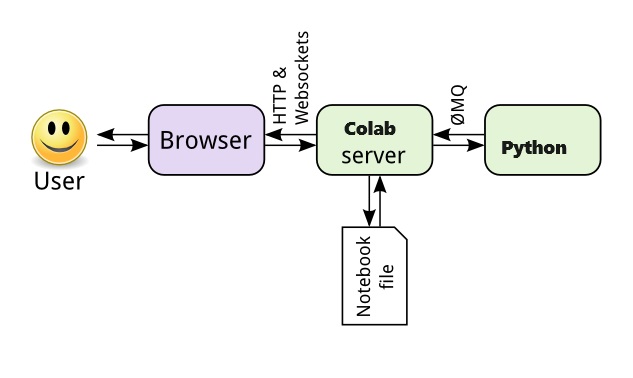
In short, Colab is an interface (inside the web broswer) via which we access Python, which runs the commands and returns results. In other words, Colab sits between your broswer and the Python kernel and helps us “communicate” with the Python back end.